Before: Create Tax Group you need to Crate Public Lighting Tax in tab Tax First
Go to Settings -> Tax -> Click Add Tax
- Name : Public Lighting Tax
- Localize Name : អាករបំភ្លឺសាធារណៈ
- Tax Rate : 5%
- Asset Account : Vat input
- Payable Account : Public Lighting Tax Payable
Note : if user not select Asset Account and Payable Account system select default account auto (Vat input & Vat output)
click save done

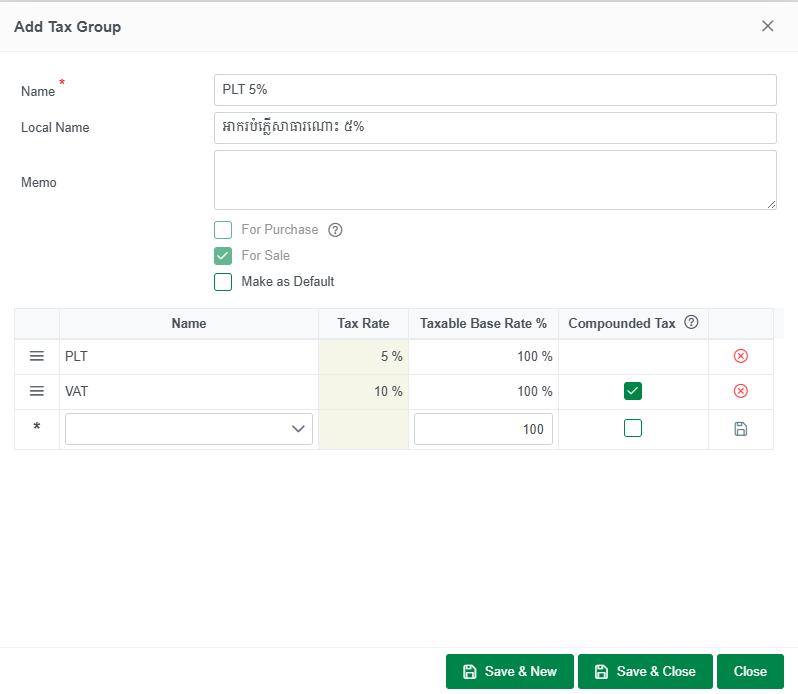
when Create Public Lighting Tax already Now u can Go to Settings -> Tax -> Click on tab Tax Group
Click Add Tax Group
- Name : PLT 5%
- Local Name : អាករបំភ្លើសារណោះ ៥%
- Select Account :
- Public Lighting Tax and 10% for Taxable Base Rate
- Vat 10 for Taxable Base Rate
Click save & Close Done