Knowledge Base Videos
Ask AI
Auto

Sections

  • Getting Started
  • User Home Page
  • Manage Business
  • Settings
    • Overview
    • Company Info
    • Branch
    • User & Role
    • Warehouse
    • Tax
    • Discount
    • Currency
    • Payment Method
    • Preference
    • Integrations
    • Templates Customization
  • Vendors
  • Customer
  • Item
  • Accounting
  • Report
  • POS
  • Terms of Use

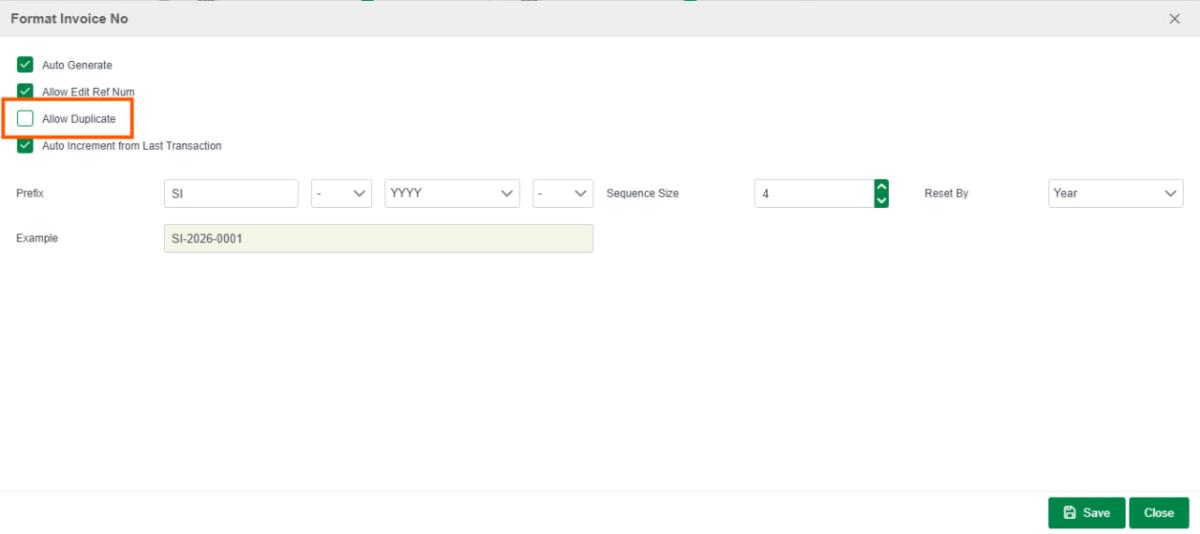
How to prevent invoice numbers from overlapping/duplicating ?

Last updated: Jul 24, 2026
ImageImage

Go to settings -> Template -> select Template you want change -> un Tick on Allow Duplicate save Done

how to create Public Lighting Tax ?

Follow the next guide to continue your journey.

Related Articles

Overview

Configuration in Localizebook allows you to do a complete set-up of your business from the Settings tab. Here, you will choose the functionality of the system, the default accounts for main functions, and the customization of form templates.

Read article

Company Info

You can insert your business or company's contact information, address, and other details in this section. When you make invoices or other forms, this data is immediately obtained.

Read article

Branch

Read article

Multi-Branch

Manage multiple branches within one company account and separate customers, vendors, and reference numbers by branch.

Read article