When setting up opening balances in LocalizeBook, your business may have outstanding amounts owed by customers from your previous accounting system.
To maintain accurate receivable records, these opening balances should be linked to the appropriate Customer Master Data using the Accounts Receivable (AR) Control Account.
This allows you to track outstanding amounts for each customer while ensuring that the total Accounts Receivable balance agrees with your general ledger.
This guide explains how to transfer the existing opening receivable balance from a temporary account to the AR Control Account without duplicating the amount already recorded in your Trial Balance.
Step 1: Prepare Your Customer Master Data
Before recording opening Accounts Receivable balances, ensure that all customers with outstanding balances have been created in LocalizeBook.
You can create customers individually or import multiple customer records.
For detailed instructions, refer to:
Important: Review customer names and codes to avoid duplicate records and ensure each opening balance is assigned to the correct customer.
Step 2: Verify the Opening Accounts Receivable Balance in the Trial Balance
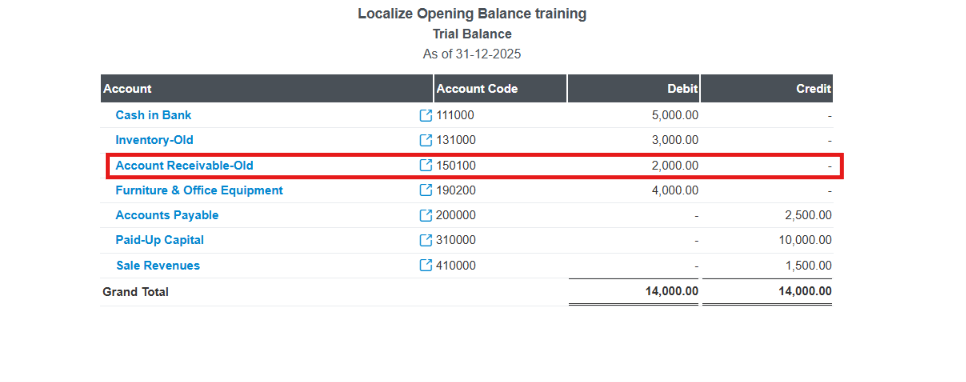
Before recording opening balances by customer, verify that the total outstanding Accounts Receivable balance has already been recorded in the Trial Balance under the temporary account Account Receivable-Old.
In this example, the Trial Balance as of 31-12-2025 shows a debit balance of 2,000.00 in Accounts Receivable-Old
Ensure the following accounts are available in your Chart of Accounts:
Account | Purpose |
|---|---|
Account Receivable-Old | Temporary non-control asset account used to hold the opening AR balance from your Trial Balance. |
AR Control Account | Records outstanding receivable balances associated with individual customers. |
The Account Receivable-Old account should be configured as an Other Current Asset account without customer control-account tracking.
For more information, refer to the Chart of Accounts Guide.
Step 3: Prepare Your Outstanding AR Balances by Customer
Prepare a list of all outstanding customer balances as of your opening balance cutoff date.
Example:
Customer | Outstanding Amount |
|---|---|
Mr. A | 1,000.00 |
Mr. B | 1,000.00 |
Total | 2,000.00 |
Ensure that the total outstanding customer balances agree with the Accounts Receivable balance in your original Trial Balance.
Step 4: Record Outstanding AR Using Journal Entry
After preparing your customers and account information, transfer the opening receivable balance to the AR Control Account.
- Go to Accounting → Journal Entry → + Add.
- Enter the opening balance cutoff date.
- Select the AR Control Account and choose the corresponding customer in the Name field.
- Enter each customer's outstanding amount in the Debit column.
- Select Account Receivable-Old and enter the total amount in the Credit column.
- Review the journal entry to ensure total debits equal total credits.
- Click Save & Close.
Example: AR Transfer Journal
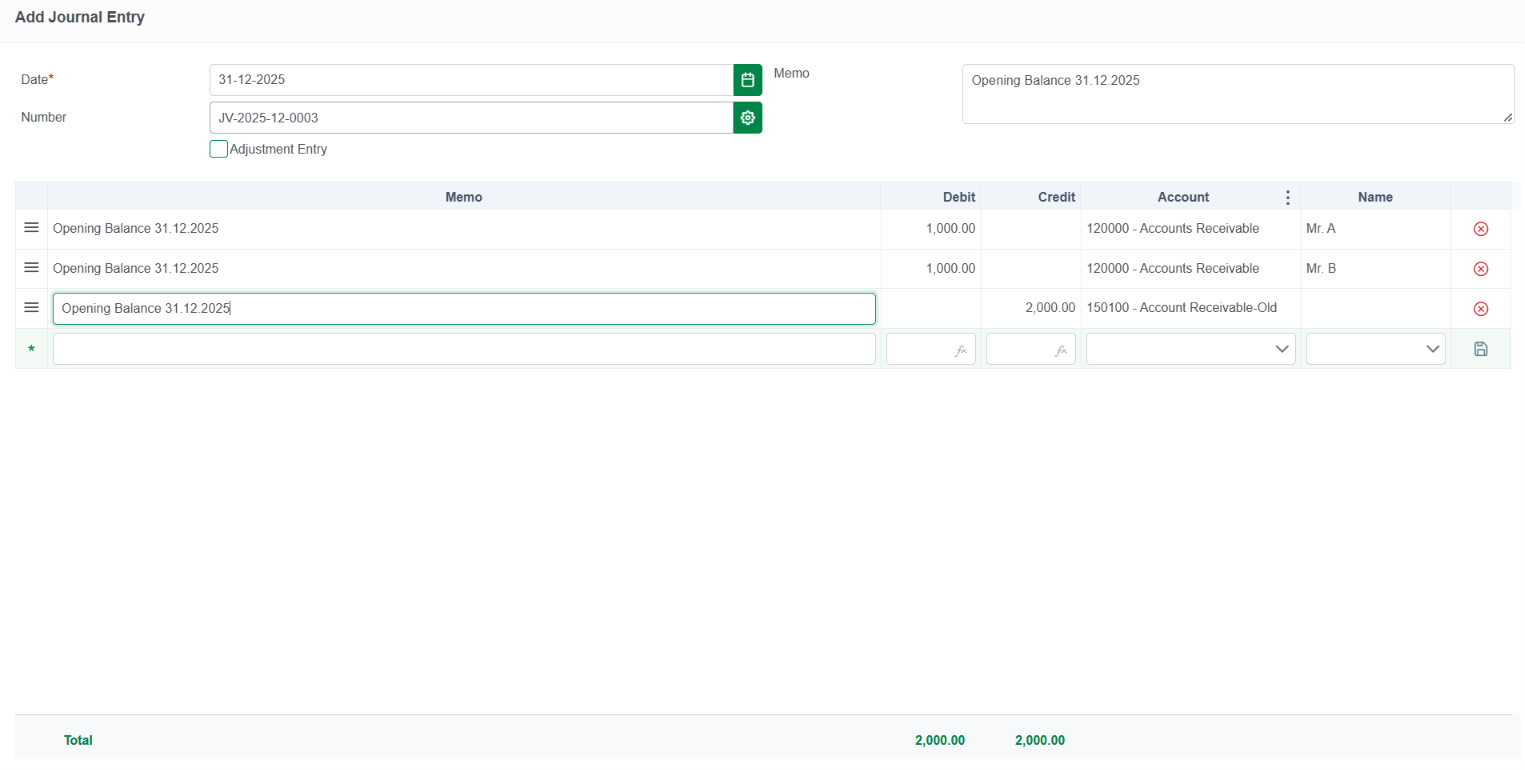
After saving, the outstanding amounts will be associated with the corresponding customers through the AR Control Account.
Note: This example assumes the original Trial Balance already contains a debit balance of 2,000.00 in Account Receivable-Old.
Step 5: Verify Your Opening Accounts Receivable Balances
After recording the opening AR journal entry, review the Trial Balance and AR Outstanding Report to ensure the balances have been transferred correctly and agree with the supporting customer records.
1. Trial Balance Report
Open the Trial Balance Report and select the opening balance cutoff date.
Verify that:
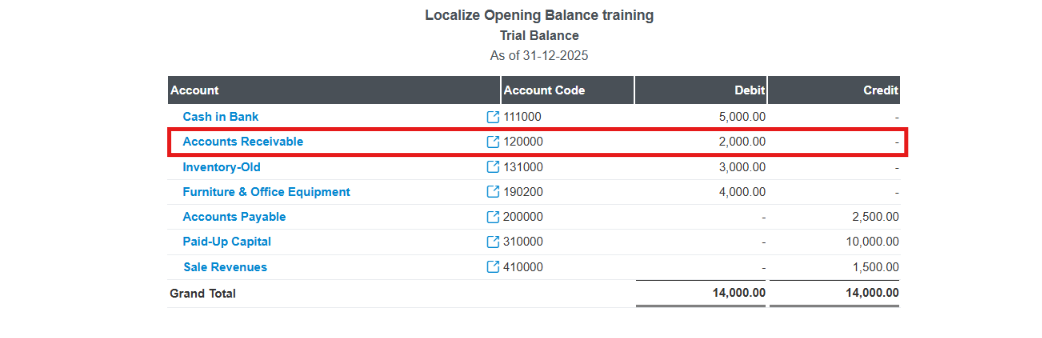
- Account Receivable-Old has a zero balance after the transfer.
- The AR Control Account shows a total debit balance of 2,000.00.
- The Trial Balance remains balanced, with total debits equal to total credits.
The transfer should not change the total assets of your business. It only moves the existing opening balance from Account Receivable-Old to the AR Control Account.
2. AR Outstanding Report
Open the AR Outstanding Report and select the appropriate reporting date.
Verify that:
- All customers with opening outstanding balances are included.
- Each customer's outstanding amount matches the original supporting records.
- The total outstanding amount is 2,000.00, agreeing with the AR Control Account in the Trial Balance.
Example:
Customer | Outstanding Amount |
|---|---|
Mr. A | 1,000.00 |
Mr. B | 1,000.00 |
Total | 2,000.00 |

Important: The total AR Outstanding Report balance should agree with the AR Control Account in the Trial Balance as of the same reporting date, provided the report includes customer-linked journal entries and no other transactions affect the balances.
Important Notes
- Ensure all required Customer Master Data has been created before recording opening AR balances.
- Select the correct customer in the Name field when recording the journal entry.
- Use the correct opening balance cutoff date for the transfer.
- Avoid recording duplicate outstanding receivable balances.
- Ensure the AR Control Account and supporting customer balances agree after the transfer.
Completion Checklist
- All customers with outstanding balances have been created.
- Account Receivable-Old and the AR Control Account are configured correctly.
- Outstanding amounts have been assigned to the correct customers.
- Account Receivable-Old has a zero balance after the transfer.
- The AR Control Account agrees with the total outstanding customer balances.
- The Trial Balance and AR Outstanding Report have been reviewed and verified.
Once all balances have been verified, your Opening Accounts Receivable (AR) by Customer setup is complete.