Knowledge Base Videos
Ask AI
Auto

Sections

  • Getting Started
  • User Home Page
  • Manage Business
  • Settings
  • Vendors
  • Customer
    • Overveiw
    • Customer Center
    • Customer Transaction
    • Create New Customer
    • Quotation
    • Sale Order
    • Sale Delivery
    • Invoice
    • Invoice Type
    • Sale Return
    • Create Collection
    • Sale Receipt
    • Customer Type
    • Sale Person
    • Price Level
    • Region
  • Item
  • Accounting
  • Report
  • POS
  • Terms of Use

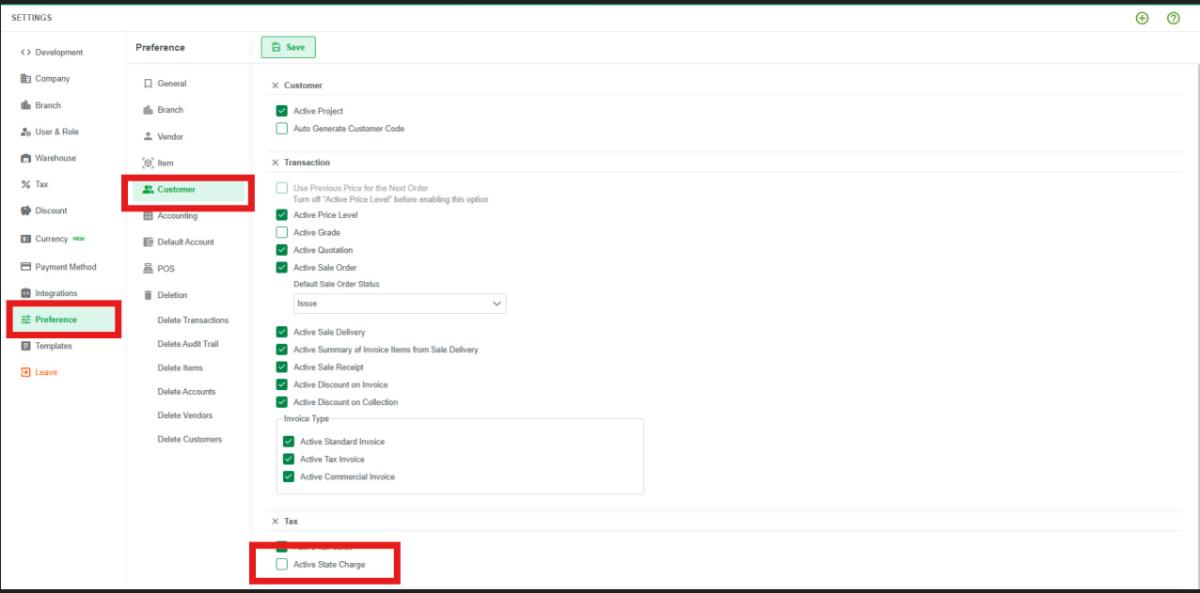
How to Enable Active State Charge In Customer ?

Last updated: Jul 29, 2026

Image

  1. Go to Settings.
  2. Click Preferences.
  3. Select Customer 3 (or Customer 1).
  4. Click Active State Charge.

Why A/R Account not Show in collection ?

Follow the next guide to continue your journey.

Related Articles

Overveiw

Learn how to manage customer information, create customer records, import customer information, and

Read article

Customer Center

Learn how to manage customer information and perform sales transactions in the Customer Center.

Read article

Customer Transaction

Read article

Create New Customer

Read article