Journal Entry is used to record a business transaction in the accounting records of a business.
In actuality, journals are used by accountants to collaborate with the general ledger and produce debit and credit entries for certain financial transactions.
In Localizebook, manual journals can be used to record these unique financial transactions which cannot be recorded normally otherwise. E.g: Depreciation rates for a month cannot be recorded normally, in this case a manual journal for the depreciation rate can be recorded for the particular month.
There are two ways of adding Journal Entry in Localizebook:
- Create Journal Entry
- Batch Journal Entry
Create Journal Entry
Go to create the Journal Entry in Localizebook:
- Go to the Accounting menu.
- Click on Journal Entry.
- Click on button +Add in the top-right of the page.
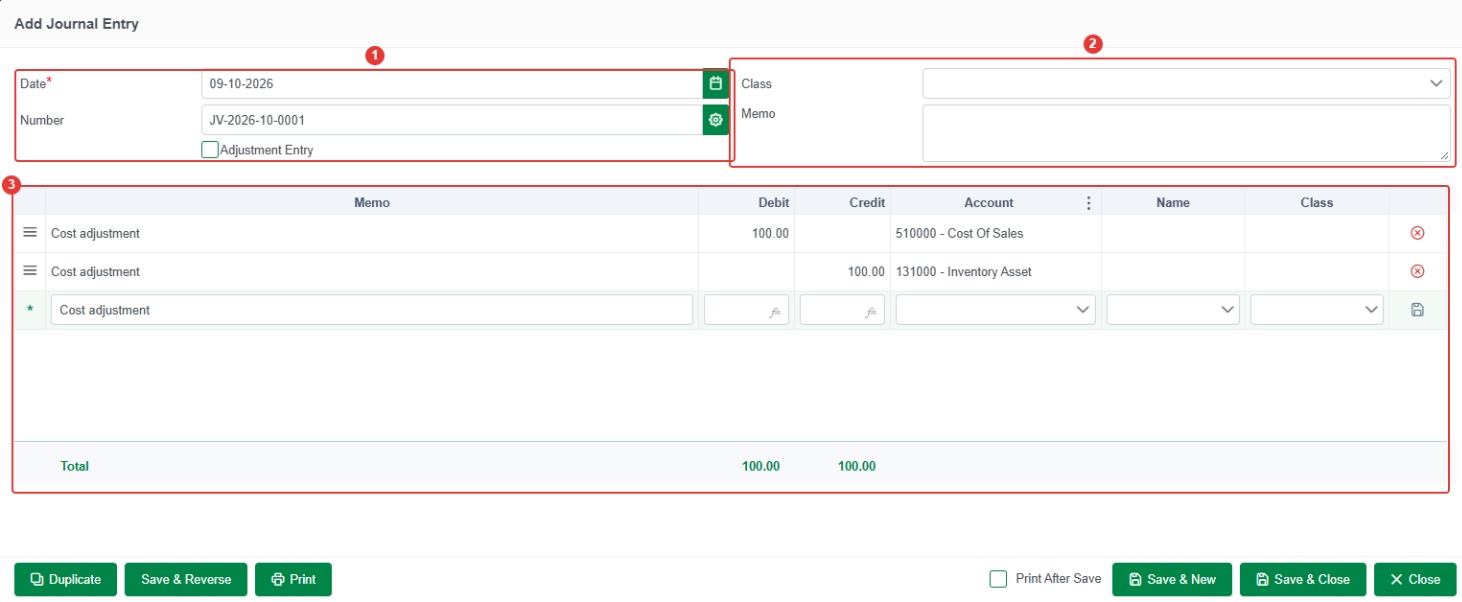
- Enter the basic information of journal entry:
1.Date: Select your transaction date.
- Number: Autor form system.
- Adjustment Entry: If you tick on Adjustment Entry, your transaction is an adjustment transaction. If you don’t tick on Adjustment Entry, your transaction is a general transaction.
2.Memo: Describe Overall your Journal.
3.Memo: Describe your Journal by account.
- Debit: Input amount.
- Credit: Input amount.
- Account: Select Account.
- After filling all with your information:
- Save & New: Save the journal entry and add another one.
- Save & Close: Save the journal entry and close the window.
- Close: Close window without saving the journal entry.
 Note:The save
 button for saving your current transaction line. if having a new transaction you must click the save button to have a new line to make a new transaction. The
 button for delete the transaction line.
Edit, Void or Delete a Journal Entry
In Accounting > Journal Entry, set the date range to see older journal entries, click the journal entry, then click Edit, Void, or Delete above the list.
- Edit: change the journal entry, then click Save & Close.
- Void: cancels the journal entry but keeps it in the list, shown in red.
- Delete: removes the journal entry completely.