These settings control accounting features, period closing, and number and date formats. Path: Settings > Preference > Accounting.
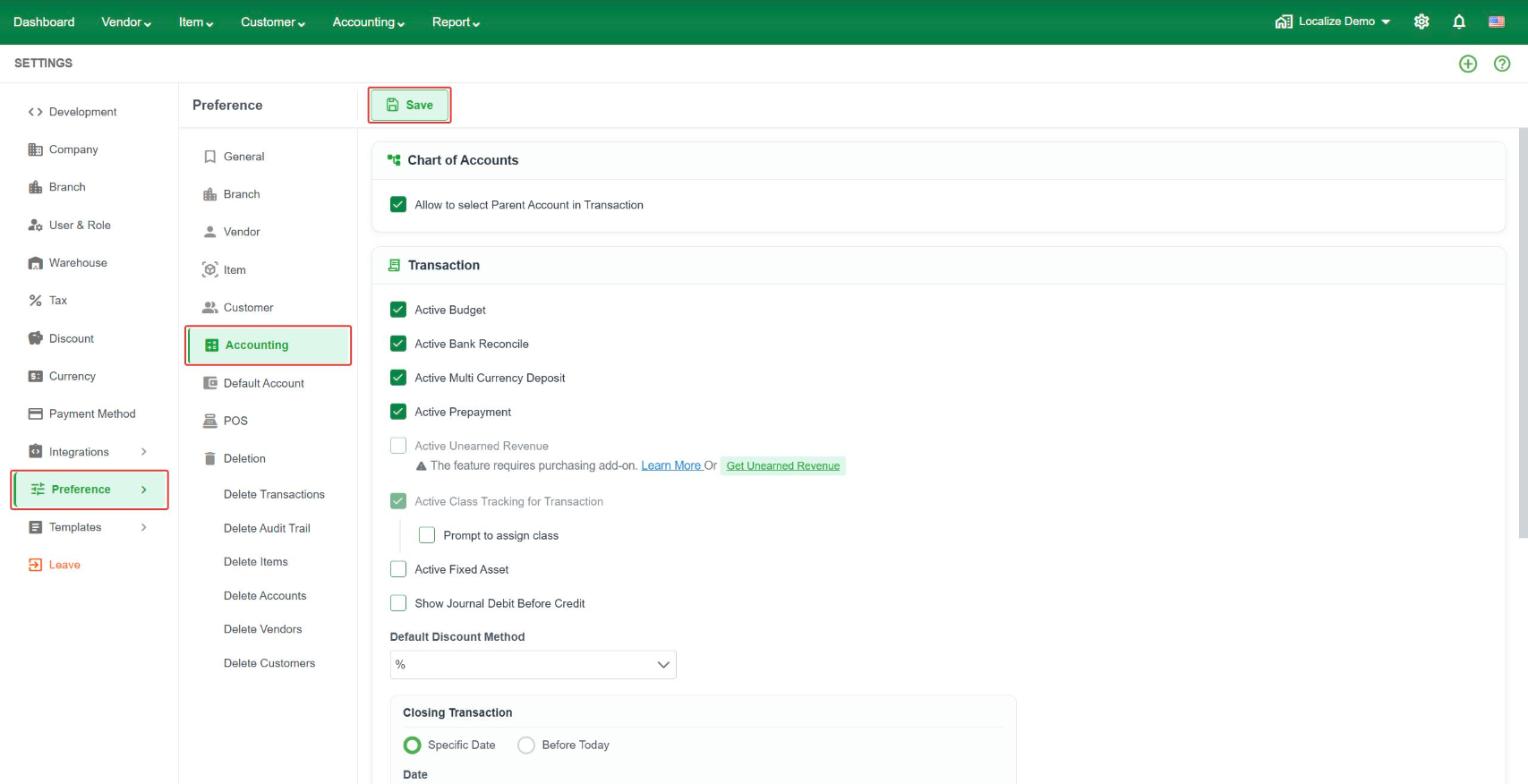 Chart of Accounts
- Allow to select Parent Account in Transaction – let users pick a parent account (not only child accounts) on a transaction.
Transaction
- Active Budget – use budgets.
- Active Bank Reconcile – use bank reconciliation.
- Active Multi Currency Deposit – allow bank deposits in more than one currency.
- Active Prepayment – use prepayments from customers and to vendors.
- Active Unearned Revenue – use unearned revenue. This requires the Unearned Revenue add-on.
- Active Class Tracking for Transaction – track class on transactions. Tick Prompt to assign class to be asked for a class when you save.
- Active Fixed Asset – use fixed assets.
- Show Journal Debit Before Credit – show the Debit column before the Credit column on journals.
- Default Discount Method – choose the default way to enter a discount, for example %.
- Discount and Tax Mode – choose how discount and tax are calculated on transactions. The three options are Before Tax, After Tax, and On Net.
1. Before Tax
The discount is applied to the transaction amount before tax is calculated.
Example:
- Item price: $100
- Discount: 10% = $10
- Taxable amount: $90
- Tax (10%): $9
- Total : $90 + $9 tax = $99
2. After Tax
The tax is calculated on the original amount first, and the discount is deducted afterward.
Example:
- Item price: $100
- Tax (10%): $10
- Discount: (10% of $110) = $11
- Total: $110 - 11$ = $99
3. On Net
The discount is applied first, and the tax is calculated based on the net amount exclude discount.
Example:
- Item price: $100
- Discount: 10% = $10
- Tax (10% of 100$): $10
- Total: 90$ + $10 = $100
Closing Transaction
Use this to lock old transactions so they cannot be changed by mistake.
- Specific Date – lock all transactions up to the date you choose.
- Before Today – lock all transactions dated before today.
- Password and Confirm Password – enter a password. Users need it to change a locked transaction. Keep it safe.
- Except Transaction – leave Purchase Order, Quotation, or Sale Order open even when the date is closed.
Format
- Format Date – the date format used across LocalizeBook, for example dd-MM-yyyy.
- Decimal Digits for Qty – how many decimal places quantities show, for example 2 gives 123.46.
- Default Qty Value – the quantity filled in on new transaction lines.
- Active Transactions with Multi-Currencies for each Vendor or Customer – allow a vendor or customer to be used in more than one currency.
- Active Compact Formatting to Amounts in Report – show large amounts in short form in reports, for example 1,000,000 as 1000K.